

About Diagram Maker: Flow & ERD
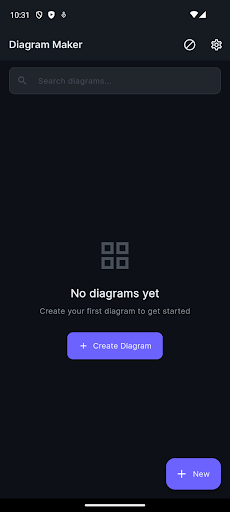
Diagram Maker is a mobile-first diagramming tool for anyone who thinks in pictures. Build flowcharts, entity-relationship diagrams (ERDs), org charts, mind maps, and free-form sketches directly on your phone. Drop shapes onto the canvas, drag them around, resize and rotate with a fingertip, and connect them with labelled arrows — or switch to the text-based editor and type your diagram as code. The shape library covers rectangles, circles, diamonds, hexagons, parallelograms, cylinders, and more, with full control over fill colour, stroke, font, corner radius, and opacity. Lasso-select to move groups, pinch to zoom, two-finger drag to pan, and auto-snap to a grid for clean alignment. Every change supports undo and redo. When you're done, export your diagram as a 2× PNG image, a single-page PDF, an editable SVG vector, or a diagram-as-code file for any text-based workflow. Everything runs on your device — no login, no cloud upload, no waiting on a server. Your diagrams stay on your phone unless you choose to share them. Built mobile-first with a calm dark theme where the canvas fills the screen, Diagram Maker is available in 15 languages.
See it in action
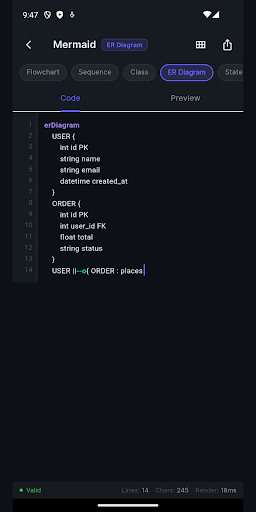
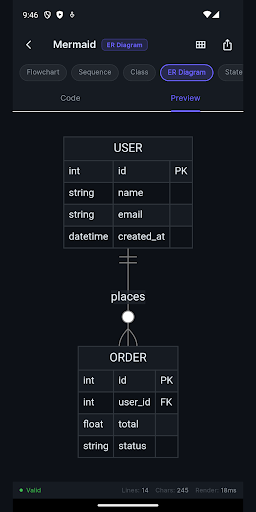
Everything You Need
Visual Drag-and-Drop Canvas
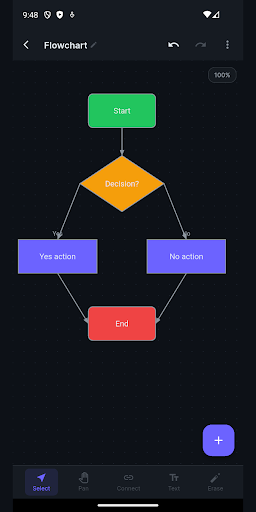
Drop shapes onto the canvas, drag to move, drag corners to resize, and drag the centre dot to rotate. Lasso-select multiple shapes and move them as a group. Pinch to zoom and two-finger drag to pan.
Flowcharts, ERDs & More
Build flowcharts with start, decision, action, and end nodes; ERDs for database design; org charts, mind maps, and idea trees. Rectangles, circles, diamonds, hexagons, cylinders, and more cover any layout.
Diagram-as-Code Editor
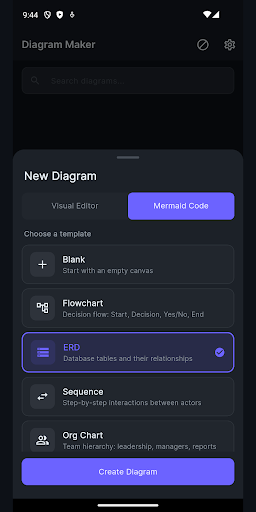
Prefer typing? Switch from the visual canvas to a text-based editor and write your diagram in plain text. Sequence and Gantt diagrams are built straight from code. Move between visual and code views any time.
Style Every Shape
Set fill colour, stroke, font, corner radius, and opacity on any shape. Double-tap to edit labels. Connect shapes with labelled arrows. Auto-snap to grid keeps everything cleanly aligned. Undo and redo every change.
Export to Any Format
Export a 2× resolution PNG, a single-page PDF sized to your diagram, an editable SVG vector for any vector tool, or a diagram-as-code file compatible with any diagram-as-code workflow.
Offline & Private
Everything runs on your device. No login, no cloud upload, no waiting on a server. Your diagrams are saved locally and stay on your phone unless you choose to share them. Available in 15 languages.
Ready to Try Diagram Maker: Flow & ERD?
Free to download. No account required. Available on Android.
Frequently Asked Questions
More from Cosmovex
Explore our other developer tools

WebEva: Build Websites & Code
Web DevelopmentBuild websites from your phone.

Aspenote: Offline Voice to Text
ProductivityIt writes it down. On your phone.

HostPilot: PHP Server & SQL
Developer ToolsTurn your phone into a web server.

DevBuddy: Offline Dev Toolkit
Developer ToolsYour pocket developer toolkit.

ShellPilot - Batch SSH Client
DevOps & ServersSSH terminal & SFTP on the go.

API Client -REST & HTTP Tester
API TestingTest APIs anywhere, anytime.

HTML Viewer & Editor - Code
Code EditorView & edit HTML on mobile.

JSON Editor - Viewer & Format
Data ToolsView, edit & format JSON instantly.
SQLite Editor & SQL Learner
Data ToolsManage SQLite databases on mobile.

Python IDE - Offline Compiler
Code EditorWrite and run Python on your phone.

Java & Kotlin Compiler IDE
Code EditorWrite and run Java on your phone.
PDF Viewer & Editor - AI
ProductivityEdit, convert & sign PDFs on mobile.

XML Viewer & Editor
Data ToolsView, edit & validate XML on mobile.

Open CSV — Viewer & Editor
Data ToolsOpen and edit CSV files on mobile.

JavaScript Editor — React IDE
Code EditorRun JavaScript and React on your phone.

Image to SVG Converter, Viewer
Design ToolsConvert images to SVG and edit vectors on mobile.

YAML / YML Viewer & Editor
Data ToolsView, edit & validate YAML instantly.

Markdown Editor & MD Viewer
Text EditorWrite and preview Markdown on mobile.

Network Toolkit: WiFi IP Tools
Network ToolsNetwork utilities and diagnostic tools.

Code Editor - Text & Notepad
Text EditorEdit text files on mobile.
C / C++ Compiler IDE
Developer ToolsCompile & run C and C++ on your phone.

QR Scanner & Generator
ToolsScan codes with confidence

Zip Extractor — Unzip RAR 7Z
ToolsOpen ZIP, RAR, and 7Z files

PromptCrate: AI Prompt Manager
ProductivityYour personal AI prompt library

AgentPager · Claude Code Codex
Developer ToolsYour coding agents, paged to your phone.